Switch Access
Advertisement
Apps Overview
Discover Switch Access APK, an Android accessibility feature that lets users control devices using switches or camera gestures for easier navigation.
Table of Contents
Switch Access APK – Android Accessibility Control Using Switches And Camera
Switch Access APK is a powerful accessibility solution developed to help people interact with Android devices without relying on direct touch input. Designed especially for users with motor impairments or limited mobility, this feature allows full control of a phone or tablet using external switches, built-in buttons, or even facial gestures through the front camera.
Unlike many standard accessibility tools that focus mainly on visual or auditory assistance, Switch Access APK focuses on alternative input methods. It transforms how users select items, scroll through content, type text, and navigate the entire Android system. With proper configuration, a single switch or a simple facial movement can replace complex touch gestures.
What Is Switch Access APK?
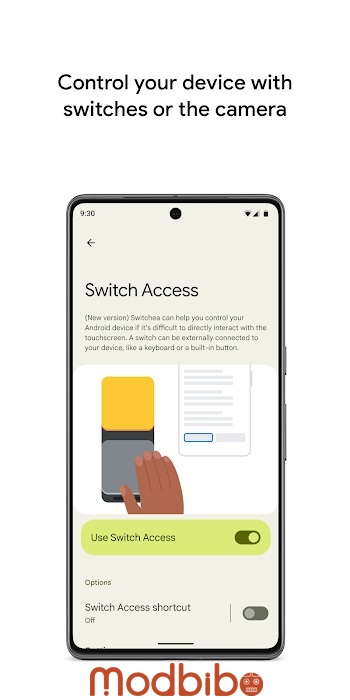
Switch Access APK is an Android accessibility service that enables users to control their devices using one or more switches instead of the touchscreen. These switches can be physical buttons, on-device keys, or camera-based facial gestures. The system automatically scans on-screen items and highlights them one by one until the user makes a selection.
By replacing touch gestures with simplified inputs, Switch Access APK allows people with limited dexterity, muscle weakness, tremors, or temporary injuries to use Android devices independently. It is also useful in educational and assistive technology environments where alternative input methods are required.
Switch Access APK integrates deeply into the Android operating system. Once enabled, it can interact with apps, menus, text fields, notifications, and system settings, providing a complete navigation experience.
Who Can Benefit From Switch Access APK?
Switch Access APK is designed with inclusivity in mind. It can benefit a wide range of users, including:
- People with motor disabilities who find touchscreens difficult or impossible to use
- Users with conditions such as cerebral palsy, ALS, spinal cord injuries, or muscular dystrophy
- Individuals recovering from surgery or injuries affecting hand movement
- Users who need hands-free device interaction
- Children or students using assistive learning technologies
Because Switch Access APK is highly customizable, it can be adapted to different abilities, preferences, and environments.
How Switch Access APK Works
Switch Access APK works by scanning the elements displayed on the screen and highlighting them in sequence. When the desired item is highlighted, the user activates a switch to select it. Additional switches can be assigned to actions such as moving forward, going back, or opening menus.
Advertisement
The scanning system ensures that every interactive element on the screen can be reached without touch input. This includes buttons, icons, text fields, lists, and even complex app interfaces.
Setting Up Switches In Switch Access APK
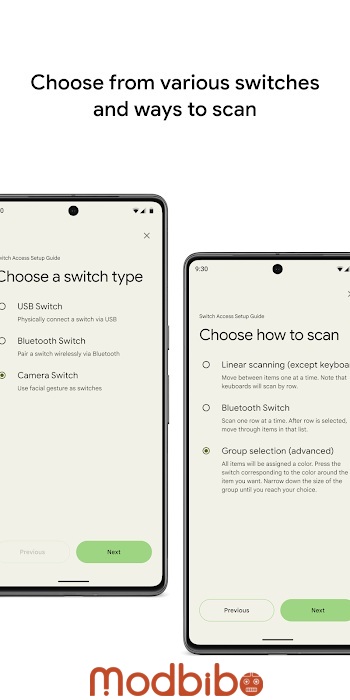
Physical Switches
Physical switches are one of the most common input methods supported by Switch Access APK. These can include:
- USB or Bluetooth switches such as adaptive buttons
- External keyboards
- On-device buttons like volume up and volume down
Physical switches are reliable and precise, making them ideal for users who can perform a consistent physical movement, such as pressing a button.
On-Device Switches
Switch Access APK allows the use of built-in hardware buttons on the device. Volume buttons are frequently used because they are easily accessible and do not require additional equipment.
This option is helpful for users who want a quick setup without external devices.
Camera Switches
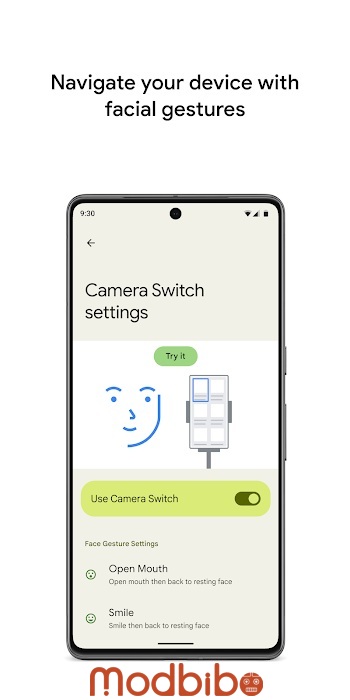
Camera switches use the device’s front camera to detect facial gestures. Switch Access APK supports gestures such as:
- Opening your mouth
- Smiling
- Raising your eyebrows
- Looking left, right, or up
Camera switches enable hands-free control and are especially useful for users with very limited physical movement. Sensitivity and activation duration can be customized to reduce accidental triggers.
Scanning Methods In Switch Access APK
Scanning is the core interaction mechanism in Switch Access APK. Android provides multiple scanning modes to match different user needs.
Linear Scanning
Linear scanning highlights items one at a time in a sequence. The user waits until the desired item is highlighted and then activates the switch to select it.
This method is simple and easy to understand, making it suitable for beginners or users who prefer predictable navigation.
Row-Column Scanning
Row-column scanning first scans rows on the screen. Once a row is selected, the system scans individual items within that row.
This method reduces the time needed to reach a specific item, especially on screens with many elements.
Point Scanning
Point scanning uses moving horizontal and vertical lines to pinpoint a specific location on the screen. The user selects the horizontal position first, then the vertical position, and finally confirms the selection.
Point scanning offers high precision and is useful for complex interfaces where items are not arranged in clear rows or columns.
Group Selection
Group selection assigns different colors to groups of items on the screen. Each color is linked to a specific switch. The user presses the switch corresponding to the color surrounding the desired item, narrowing down the selection step by step.
This method can significantly speed up navigation and reduce fatigue.
Using Menus In Switch Access APK
When an item is selected, Switch Access APK displays a contextual menu with available actions. These actions depend on the selected element and may include:
- Select
- Scroll
- Copy
- Paste
- Edit text
- Open links
In addition to contextual menus, there is a global menu at the top of the screen. This menu provides system-level actions such as:
- Opening notifications
- Going to the home screen
- Viewing recent apps
- Adjusting volume
- Accessing quick settings
The menu system ensures that all device functions remain accessible without touch input.
Navigating With Camera Switches
Camera switches represent one of the most innovative features of Switch Access APK. By using facial gestures detected by the front camera, users can navigate their device entirely hands-free.
Each facial gesture can be assigned to a specific action, such as:
- Moving to the next item
- Selecting the highlighted item
- Opening the menu
- Going back
Sensitivity settings allow users to adjust how easily a gesture is recognized. Duration settings help prevent accidental activation by requiring gestures to be held for a certain amount of time.
This level of customization makes camera switches adaptable to a wide range of facial movement abilities.
Recording Shortcuts In Switch Access APK
Switch Access APK allows users to record custom touch gestures and assign them to a switch or menu option. Recorded gestures can include:
- Swiping
- Scrolling
- Pinching
- Zooming
- Double tapping
Once recorded, these gestures can be triggered with a single switch activation. For example, a user can record a gesture that swipes left twice to turn two pages in an ebook, then activate that gesture instantly whenever needed.
Recorded shortcuts are especially useful for repetitive or complex actions that would otherwise require multiple steps.
Text Entry With Switch Access APK
Typing text without a touchscreen can be challenging, but Switch Access APK provides solutions to make text entry manageable.
Users can navigate on-screen keyboards using scanning and select individual letters or words. Predictive text and suggestions can also be accessed through scanning menus.
Advertisement
Although text entry may be slower compared to touch typing, consistent practice and customization can significantly improve speed and accuracy.
Customization And Settings
Switch Access APK offers extensive customization options to suit individual needs. Users can adjust:
- Scanning speed
- Highlight color and style
- Switch assignments
- Gesture sensitivity
- Menu layout
These settings allow users to fine-tune their experience and create a setup that feels comfortable and efficient.
Accessibility Permissions And Privacy
Accessibility Service Permission
Switch Access APK requires Accessibility Service permission to function. This allows the service to:
- Observe user actions
- Retrieve window content
- Read on-screen text
- Perform navigation actions
This permission is essential for enabling alternative input methods, but it also means the service has broad access to system content.
Android includes safeguards to ensure that accessibility services are used responsibly. Users should only enable Switch Access APK from trusted system settings and understand how accessibility permissions work.
Real-World Use Cases Of Switch Access APK
Switch Access APK is widely used in real-world scenarios, including:
- Assistive communication for people with disabilities
- Educational environments for students with special needs
- Hands-free device use in medical settings
- Temporary accessibility during injury recovery
Its flexibility makes it suitable for both permanent and temporary accessibility needs.
Advantages Of Switch Access APK
Switch Access APK offers several important benefits:
- Enables full device control without touch
- Supports multiple input methods
- Highly customizable scanning and gestures
- Integrated directly into Android
- Improves independence and accessibility
These advantages make it one of the most comprehensive accessibility tools available on Android.
Limitations And Challenges
Despite its strengths, Switch Access APK also has limitations:
- Learning curve for new users
- Slower navigation compared to touch input
- Not all third-party apps are fully optimized for switch navigation
- Camera switches may be affected by lighting conditions
Understanding these limitations helps users set realistic expectations and choose appropriate settings.
Best Practices For Using Switch Access APK
To get the most out of Switch Access APK, users should:
- Start with simple scanning modes
- Gradually add more switches or gestures
- Customize sensitivity and timing settings
- Practice regularly to build familiarity
- Use recorded shortcuts for frequent actions
These practices can significantly improve efficiency and comfort.
The Role Of Switch Access APK In Digital Accessibility
Switch Access APK plays a crucial role in promoting digital inclusion. By providing alternative input methods, it ensures that Android devices remain usable for people with diverse abilities.
As accessibility awareness grows, tools like Switch Access APK demonstrate how thoughtful design can remove barriers and empower users to participate fully in digital life.
Conclusion
Switch Access APK is a powerful and versatile accessibility feature that transforms how users interact with Android devices. By replacing touch input with switches and camera-based gestures, it opens up new possibilities for people who cannot use traditional touchscreens.
With multiple scanning methods, customizable settings, recorded shortcuts, and hands-free navigation, Switch Access APK offers a complete solution for alternative device control. While it may require time and practice to master, the benefits in independence and accessibility are substantial.
As Android continues to evolve, Switch Access APK remains a vital tool in ensuring that technology is accessible to everyone, regardless of physical ability.